Tracing + Evaluation
This page explains the workflow for collecting inference log data and annotation information from datasets with ground truth, and running evaluations using the MLdebugger SDK.
Overview
The Tracing + Evaluation flow consists of the following steps:
- Set up authentication credentials
- Collect inference log data and annotation information with Tracer
- Run evaluation with Evaluator
- Review results
The Tracer class used in STEP 2 varies by task:
| Task | Tracer Class |
|---|---|
| Classification | ClassificationTracer |
| Object Detection | ObjectDetectionTracer |
| 3D Object Detection | ObjectDetection3DTracer |
STEP 1: Set Up Authentication Credentials
Set authentication credentials in environment variables to connect to the MLdebugger API. For API Key generation, see Authentication.
export MLD_API_ENDPOINT="https://api.adansons.ai"
export MLD_API_KEY="mldbg_*************"
import os

os.environ["MLD_API_ENDPOINT"] = "https://api.adansons.ai"
os.environ["MLD_API_KEY"] = "mldbg_*************"
STEP 2: Collect Data with Tracer
Use ClassificationTracer to collect internal features and label information during model inference.
Initialize Tracer
from ml_debugger.training import ClassificationTracer

tracer = ClassificationTracer(
    model,                      # Model to evaluate
    model_name="resnet18",      # Model identifier
    version_name="v1",          # Version identifier
)
Collect Data
Collect data in batches using a DataLoader.
import torch

for image, label, indices in dataloader:
    image = image.to(device)
    label = label.to(device)

    with torch.no_grad():
        _ = tracer(
            image,                                              # Input data
            label,                                              # Ground truth label
            input_ids=indices.cpu().numpy(),                    # Data identifiers
            dataset_type="train",                               # Dataset type
            n_epoch=0,                                          # Epoch number (optional)
        )
Upload Data
Upload collected data to the API server.
tracer.wait_for_save()
Use ObjectDetectionTracer to collect inference results and ground truth from Object Detection models.
Supported Models:
| Framework | Supported Models |
|---|---|
| PyTorch | Faster R-CNN, SSD, YOLOv8 (Ultralytics), CenterNet, DETR |
| TensorFlow | KerasCV, TF Object Detection API, Custom Keras |
DETR Family Support
DETR (DEtection TRansformer) and its variants (Conditional DETR, Deformable DETR) are supported.
Both Facebook Research DETR and HuggingFace Transformers DETR models are auto-detected.
DETR does not use NMS — the iou_thresh parameter is ignored. Filtering is controlled by score_thresh and max_detections_per_image.
Initialize Tracer
from ml_debugger.training import ObjectDetectionTracer

tracer = ObjectDetectionTracer(
    model,                          # PyTorch or TensorFlow OD model
    model_name="faster_rcnn",       # Model identifier
    version_name="v1",              # Version identifier
    score_thresh=None,              # NMS score threshold (optional, auto-inferred from model)
    iou_thresh=None,                # NMS IoU threshold (optional, auto-inferred from model)
    max_detections_per_image=None,  # NMS max detections (optional, auto-inferred from model)
)
ObjectDetectionTracer is a factory function that auto-detects the model's framework (PyTorch / TensorFlow) and architecture, returning the appropriate tracer subclass.
| Parameter | Type | Default | Description |
|---|---|---|---|
model |
nn.Module / tf.keras.Model |
(required) | Target OD model |
model_name |
str |
(required) | Model identifier |
version_name |
str |
(required) | Version identifier |
score_thresh |
Optional[float] |
None |
NMS score threshold. Auto-inferred from model if not specified, falls back to 0.05 |
iou_thresh |
Optional[float] |
None |
NMS IoU threshold. Auto-inferred from model if not specified, falls back to 0.5 |
max_detections_per_image |
Optional[int] |
None |
Max detections after NMS. Auto-inferred from model if not specified, falls back to 300 |
Collect Data
Collect data in batches using a DataLoader.
import torch

for images, targets, image_ids in dataloader:
    images = images.to(device)

    _ = tracer(
        images,                         # Input images (B, C, H, W)
        targets,                        # Ground truth
        input_ids=image_ids,            # Image identifiers
        dataset_type="train",           # Dataset type
        n_epoch=0,                      # Epoch number (optional)
    )
Ground Truth Format
Ground truth supports two formats:
List[Dict] format — A list of dicts with boxes and labels per image:
ground_truth = [
    {
        "boxes": torch.tensor([[x1, y1, x2, y2], ...]),  # (N, 4)
        "labels": torch.tensor([0, 1, ...]),              # (N,)
    },
    ...  # One per image in the batch
]
Dict[str, List] format — A dict with boxes and labels keys, each containing per-image lists:
ground_truth = {
    "boxes": [tensor_img1, tensor_img2, ...],
    "labels": [tensor_img1, tensor_img2, ...],
}
Coordinate Format
Bounding boxes should be in [x1, y1, x2, y2] (top-left, bottom-right) format.
Upload Data
Upload collected data to the API server.
tracer.wait_for_save()
Use ObjectDetection3DTracer to collect inference results and ground truth from 3D Object Detection models.
Supported Models:
| Model | Category | Modality | Primary Frameworks |
|---|---|---|---|
| PointPillars | Pillar-based | LiDAR-only | MMDetection3D, OpenPCDet |
| CenterPoint | Anchor-free center-based | LiDAR-only | MMDetection3D, OpenPCDet |
| BEVFormer | BEV Transformer | Camera-only | MMDetection3D |
| BEVFusion | Multi-modal fusion | LiDAR+Camera | MMDetection3D, OpenPCDet |
Derivative Model Support
Each model also supports derivative models with the same output format:
- PointPillars: PointPillars++, EFMF-Pillars
- CenterPoint: CenterFormer, VoxelNeXt, TransFusion, Voxel R-CNN
- BEVFormer: BEVDet, BEVDet4D, StreamPETR
- BEVFusion: Att-BEVFusion, SAMFusion
BEVFormer Family Support
BEVFormer and its derivatives use DETR-style Transformer query output.
They do not use NMS — the iou_thresh parameter is ignored. Filtering is controlled by score_thresh and max_detections_per_frame.
Initialize Tracer
from ml_debugger.training import ObjectDetection3DTracer

tracer = ObjectDetection3DTracer(
    model,                              # PyTorch 3D OD model
    model_name="centerpoint",           # Model identifier
    version_name="v1",                  # Version identifier
    score_thresh=None,                  # Score threshold (optional, auto-inferred from model)
    iou_thresh=None,                    # BEV IoU threshold (optional, auto-inferred from model)
    max_detections_per_frame=None,      # Max detections per frame (optional, auto-inferred from model)
    pc_range=[-51.2, -51.2, -5.0, 51.2, 51.2, 3.0],  # Point cloud range (required for BEVFormer, auto-inferred from model)
)
ObjectDetection3DTracer is a factory function that auto-detects the model's architecture and returns the appropriate tracer subclass.
input_id / input_hash guideline
Set input_id to the smallest unit where inference is expected to be reproducible under fixed inference settings.
For 3D OD, this is typically one frame (one timestamp). input_hash is derived from all modalities in that frame.
| Parameter | Type | Default | Description |
|---|---|---|---|
model |
nn.Module |
(required) | Target 3D OD model |
model_name |
str |
(required) | Model identifier |
version_name |
str |
(required) | Version identifier |
score_thresh |
Optional[float] |
None |
Score threshold. Auto-inferred from model if not specified, falls back to 0.1 |
iou_thresh |
Optional[float] |
None |
BEV IoU threshold. Only effective for PointPillars (other models do not use NMS). Auto-inferred from model if not specified, falls back to 0.2 |
max_detections_per_frame |
Optional[int] |
None |
Max detections per frame. Auto-inferred from model if not specified, falls back to 300 |
pc_range |
Optional[List[float]] |
None |
Point cloud range [x_min, y_min, z_min, x_max, y_max, z_max]. Required for BEVFormer. Auto-inferred from model if not specified, raises error if unavailable. |
Collect Data
Collect data in batches using a DataLoader.
LiDAR Input (Point Cloud Tensor):
import torch

for points, targets, frame_ids in dataloader:
    points = points.to(device)

    _ = tracer(
        points,                         # Point cloud (N, 4+)
        targets,                        # Ground truth
        input_ids=frame_ids,            # Frame identifiers
        dataset_type="train",           # Dataset type
        n_epoch=0,                      # Epoch number (optional)
    )
Dict Input (MMDetection3D format):
for batch_data in dataloader:
    model_input = {
        "points": [pts.to(device) for pts in batch_data["points"]],
        "img": batch_data["img"].to(device),
        "img_metas": batch_data["img_metas"],
    }

    _ = tracer(
        model_input,                    # Dict-format input
        batch_data["gt"],               # Ground truth
        input_ids=batch_data["frame_ids"],
        dataset_type="train",
        n_epoch=0,
    )
Ground Truth Format
List[Dict] format — A list of dicts with boxes_3d and labels_3d per frame:
ground_truth = [
    {
        "boxes_3d": torch.tensor([[cx, cy, cz, w, l, h, yaw], ...]),  # (N, 7)
        "labels_3d": torch.tensor([0, 1, ...]),                        # (N,)
        "velocities": torch.tensor([[vx, vy], ...]),                   # (N, 2) optional
    },
    ...  # One per frame in the batch
]
Dict[str, List] format — A dict with boxes_3d and labels_3d keys, each containing per-frame lists:
ground_truth = {
    "boxes_3d": [tensor_frame1, tensor_frame2, ...],
    "labels_3d": [tensor_frame1, tensor_frame2, ...],
    "velocities": [tensor_frame1, tensor_frame2, ...],  # optional
}
3D Bounding Box Format
3D bounding boxes should be in [cx, cy, cz, w, l, h, yaw] 7-DoF format.
Coordinates are in meters, yaw is in radians.
Velocity Field
For models with velocity estimation (CenterPoint, BEVFusion), you can include a velocities field ([vx, vy] m/s) in the ground truth.
Upload Data
Upload collected data to the API server.
tracer.wait_for_save()
When using n_epoch
If you specified n_epoch during data collection, you must pass the same n_epoch to wait_for_save().
tracer.wait_for_save(n_epoch=0)
Using n_epoch
By specifying the n_epoch parameter, you can collect data by epoch.
Specify n_epoch="latest" during evaluation to evaluate only the latest epoch data.
STEP 3: Run Evaluation with Evaluator
Use Evaluator to run evaluation on the collected data. Use the same model_name and version_name specified in the Tracer.
from ml_debugger.evaluator import Evaluator

evaluator = Evaluator(
    model_name="<your_model_name>",
    version_name="v1",
)

# Run evaluation
result = evaluator.request_evaluation()
request_evaluation() accepts the following optional arguments:
| Argument | Type | Default | Description |
|---|---|---|---|
result_name |
Optional[str] |
None |
Custom name for the evaluation result. If not specified, a name is auto-generated. |
n_epoch |
Union[str, int, None] |
"latest" |
Target epoch for evaluation. Use "latest" for the latest epoch, an integer for a specific epoch, or None to evaluate all epochs. |
# Specify a result name and evaluate a specific epoch
result = evaluator.request_evaluation(
    result_name="my_model_experiment_001",
    n_epoch=5,
)
Get Past Evaluation Results
# Get list of evaluation results
evaluator.list_results()

# Get specific evaluation result
result = evaluator.get_result(result_name="<result_name>")
STEP 4: Review Results
Review Evaluation Results in GUI
-
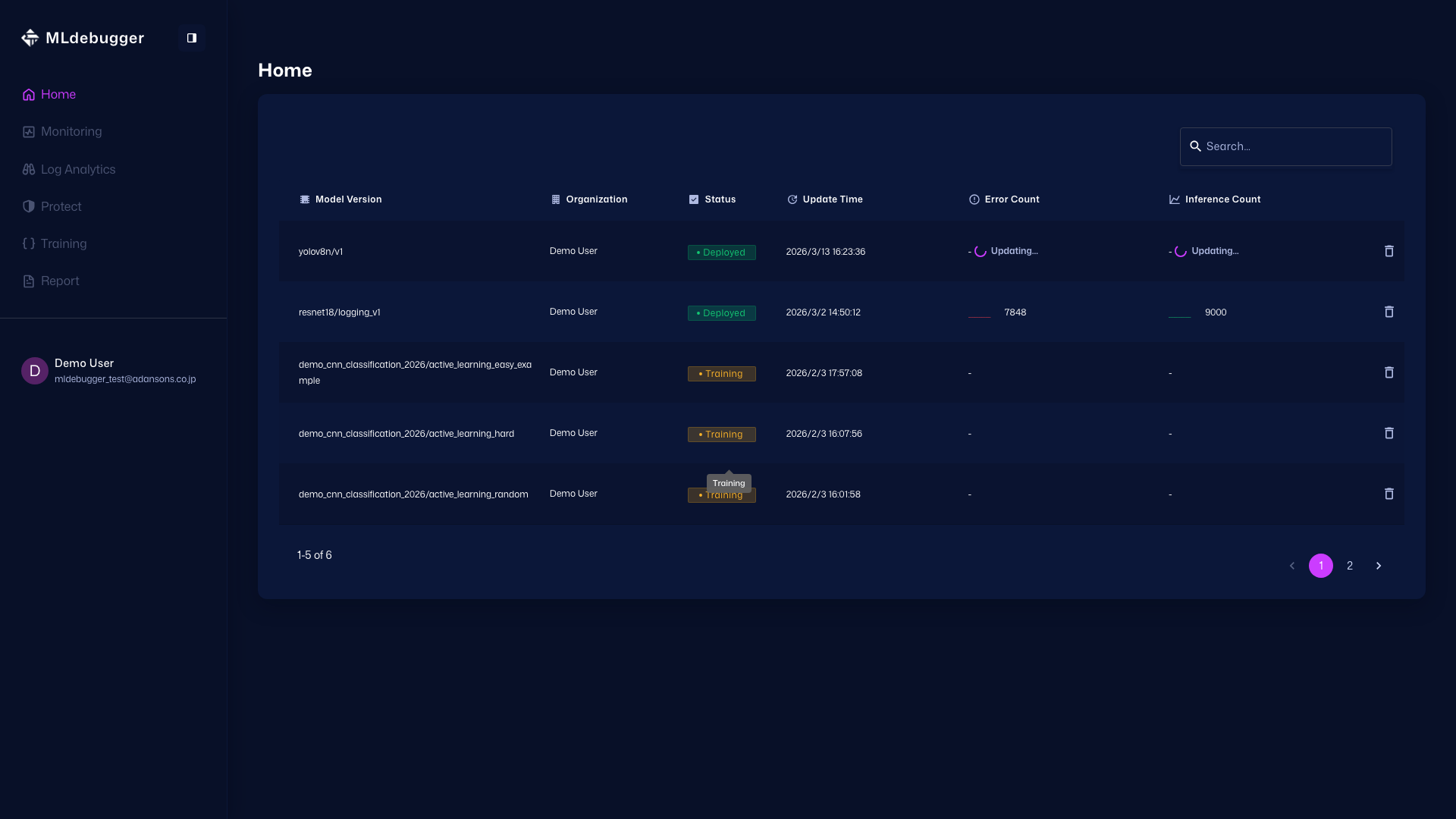
Home - Open the target model and move to the Training screen.
Home: https://app.adansons.ai/home
Training: https://app.adansons.ai/training
-
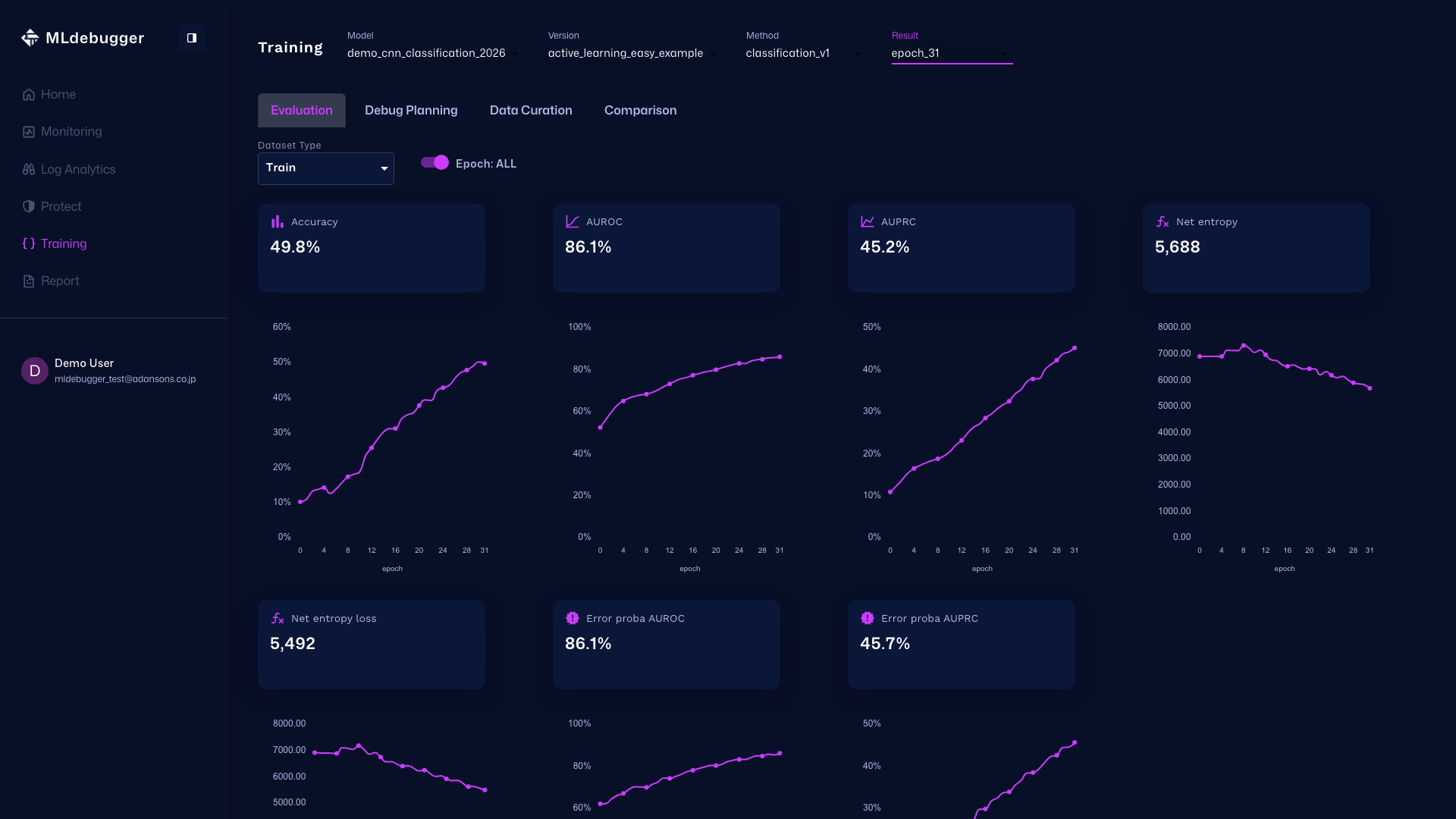
Evaluation with GT - In this screen, you can review evaluation results. Use error codes and heatmaps to understand model performance on datasets with ground truth.
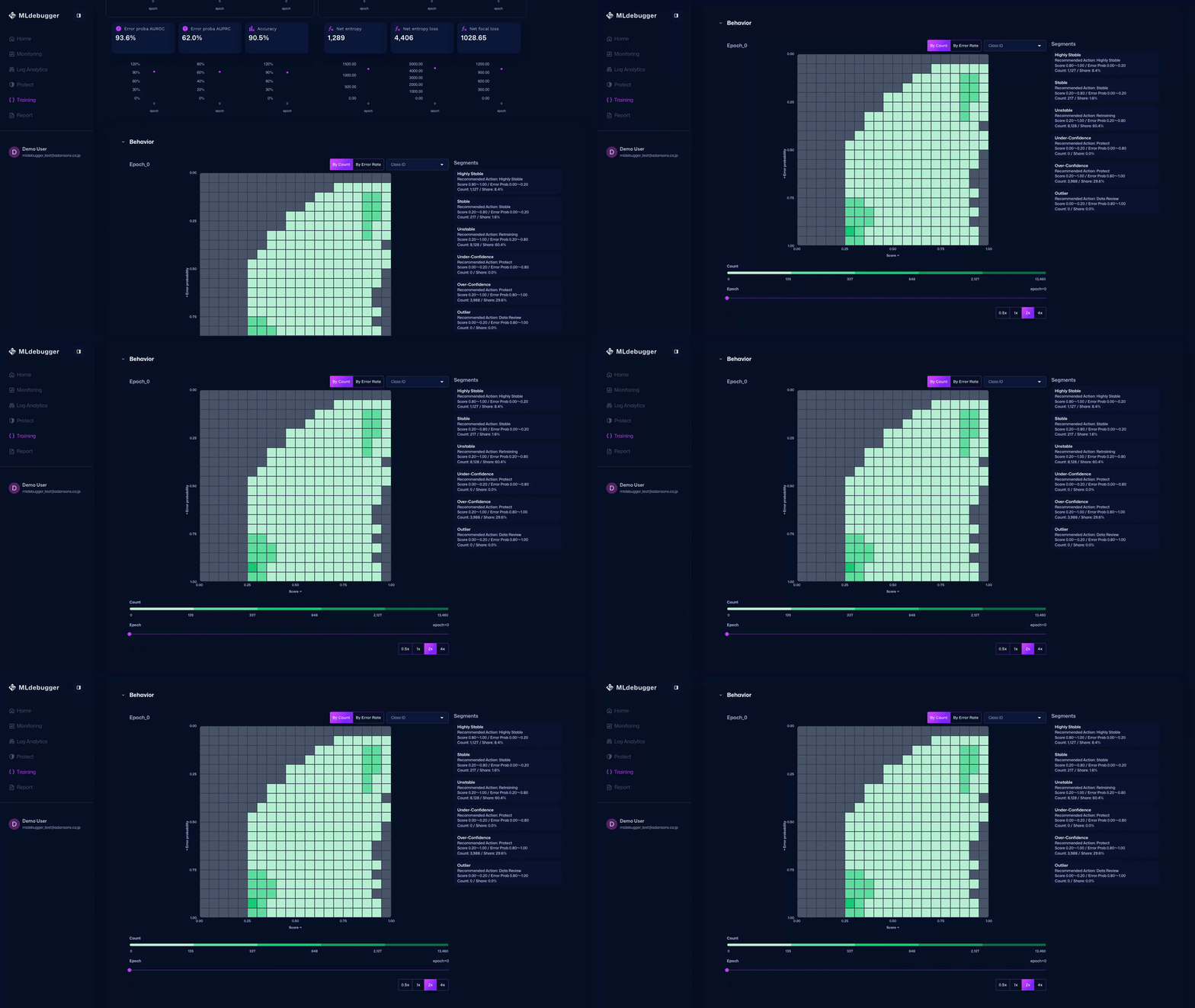
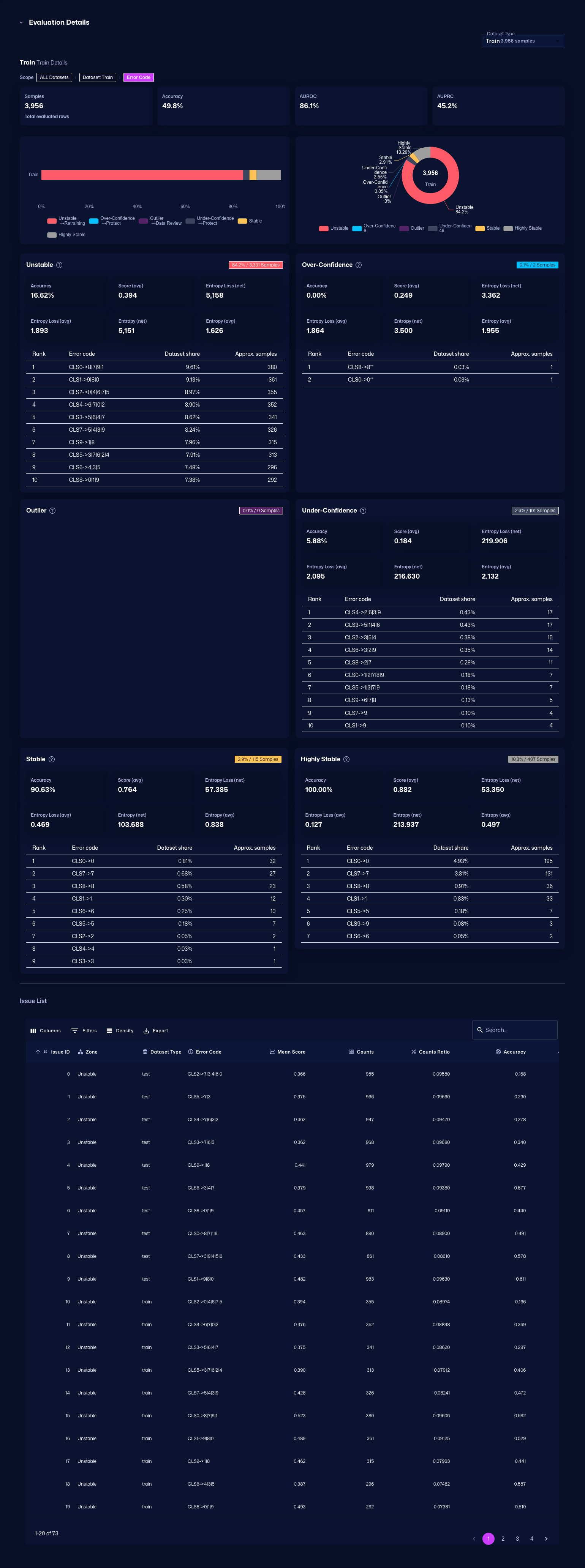
You can also check detailed error codes by category, review recommended debugging methods, and identify which error codes occur most frequently.
-
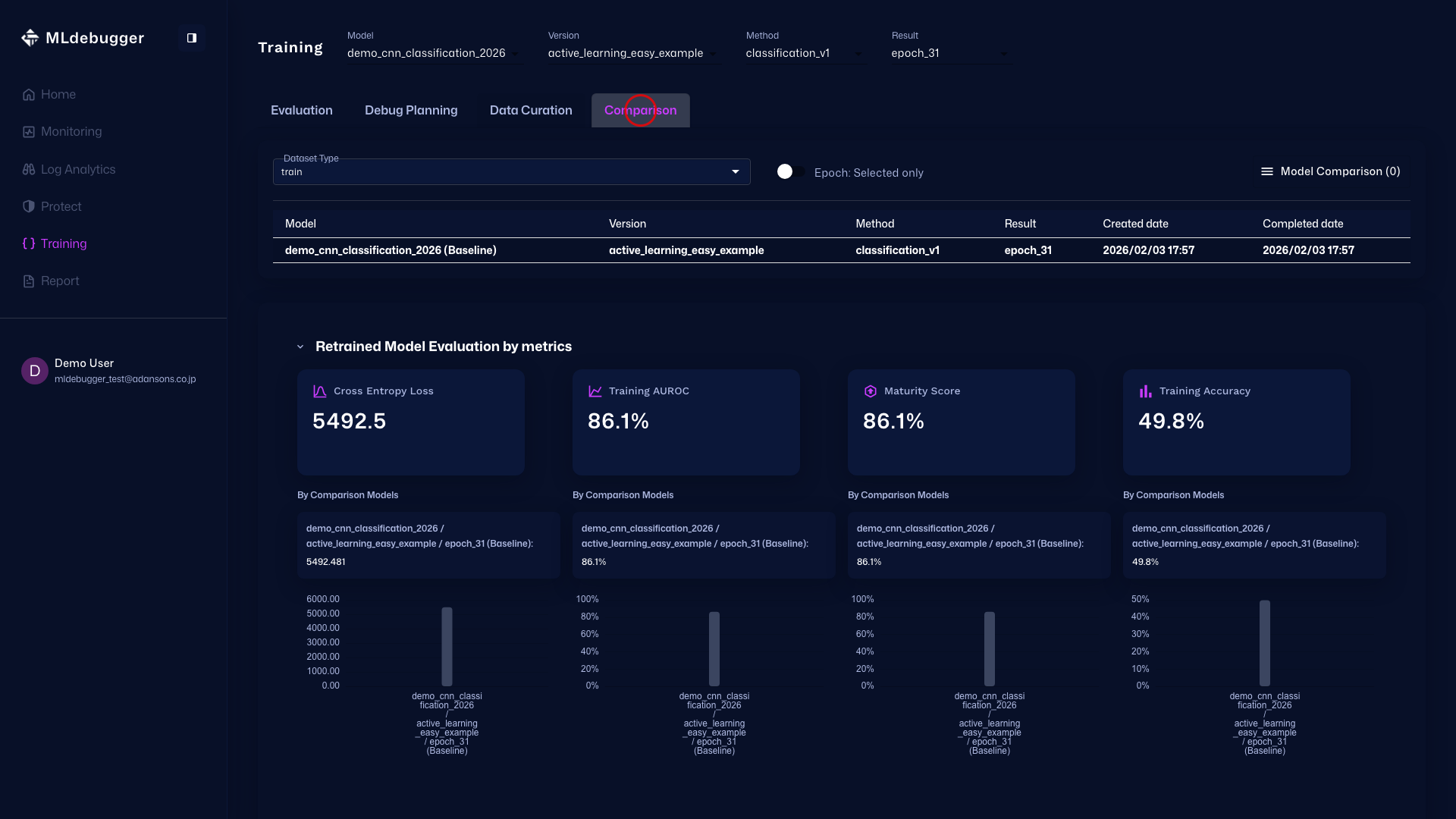
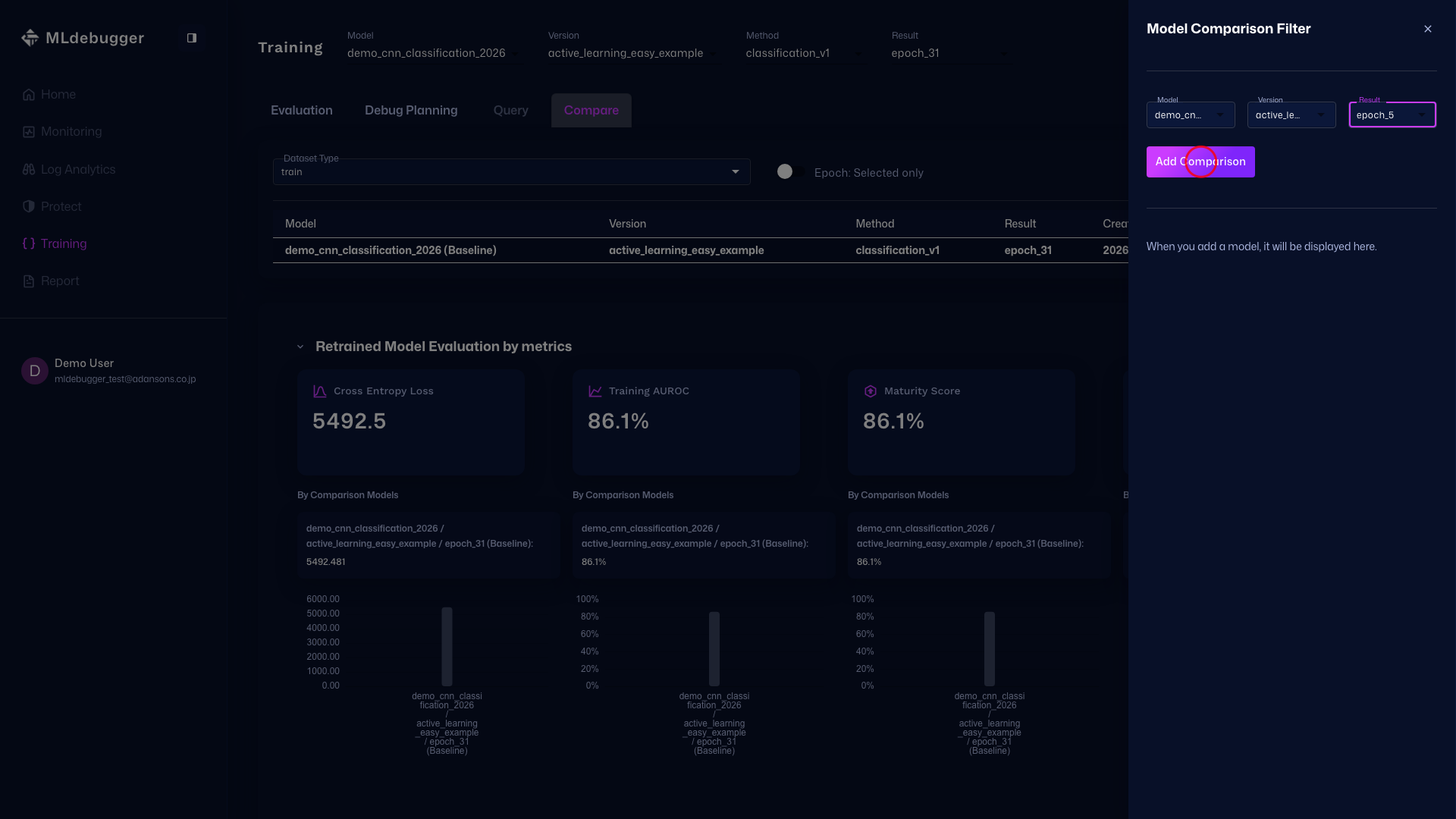
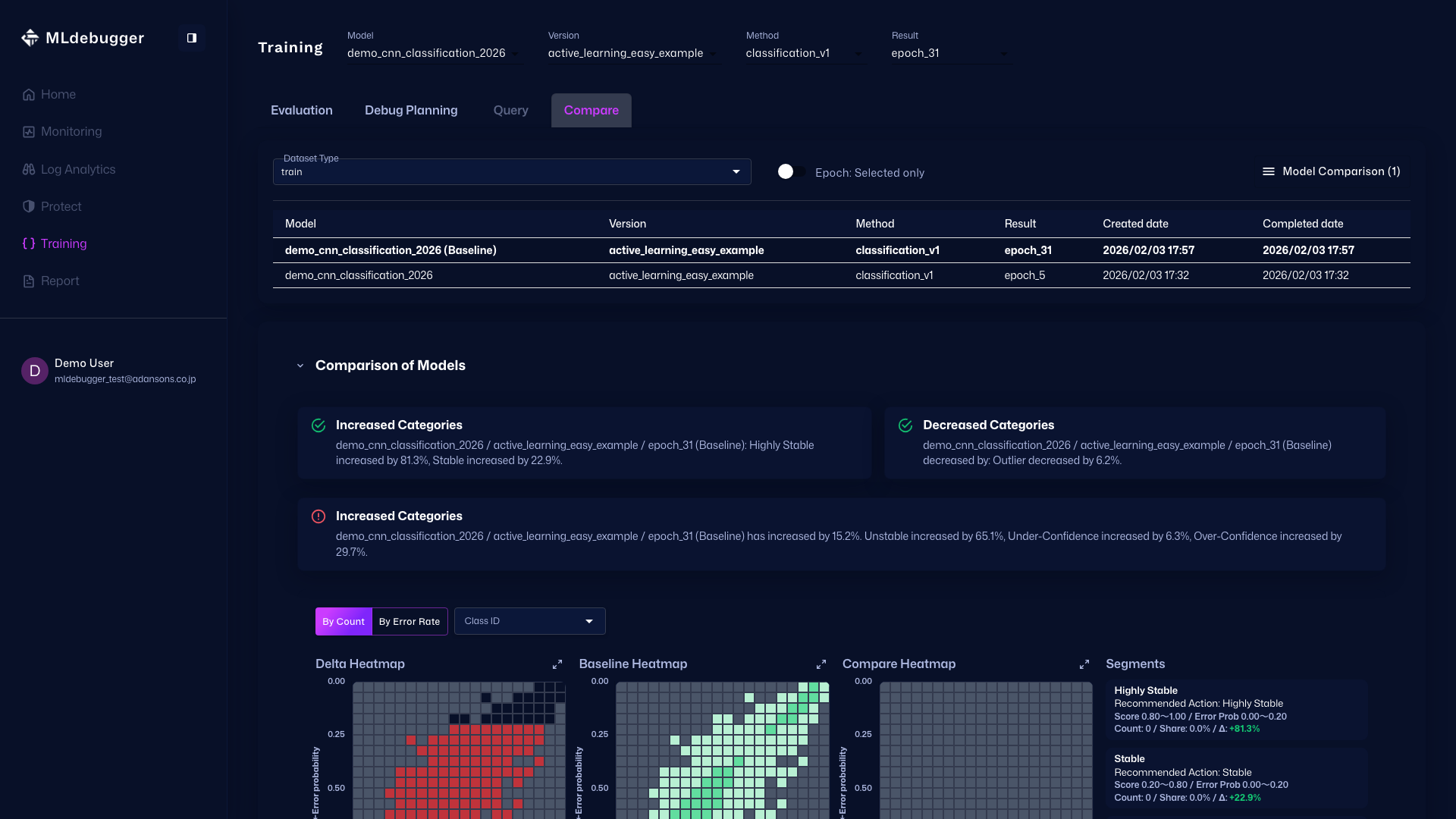
Compare - You can also compare model performance with other models on this screen.
Review Evaluation Results with SDK
Use the Result object to review evaluation results.
Metrics Summary
print(result.metrics_summary())
Example output:
dataset  counts  accuracy  auroc  auprc  net_entropy_loss  net_entropy  error_proba_auroc  error_proba_auprc
train    5000    0.098     0.457  0.094  12875.500         10480.190    0.857              0.453
Issue Category Summary
print(result.issue_category_summary())
Example output:
dataset  stable_coverage_ratio  operational_coverage_ratio  hotspot_ratio  recessive_hotspot_ratio  critical_hotspot_ratio  aleatoric_hotspot_ratio
train    0.000                  0.001                       0.753          0.226                    0.019                   0.006
Detailed Summary
result.get_summary()
This method displays metrics, Issue Category, and detailed error code distribution for each category.
Get Issue List
issues_df = result.get_issues()
You can get a list of all Issues (error codes) as a DataFrame.
Get Custom View
result.get_view(
    groupby=["category", "error_code"],
    adjustby="category"
)
You can get custom views with grouping and filtering.
Complete Sample Code
import os
import torch
from ml_debugger.training import ClassificationTracer
from ml_debugger.evaluator import Evaluator

# Set authentication credentials
os.environ["MLD_API_ENDPOINT"] = "https://api.adansons.ai"
os.environ["MLD_API_KEY"] = "mldbg_*************"

# Prepare model and dataloader (user implementation)
model = ...  # Trained model
dataloader = ...  # DataLoader
device = torch.device("cuda" if torch.cuda.is_available() else "cpu")

model.to(device)
model.eval()

# Initialize Tracer
tracer = ClassificationTracer(
    model,
    model_name="my_model",
    version_name="v1",
)

# Collect data
for image, label, indices in dataloader:
    image = image.to(device)
    label = label.to(device)
    with torch.no_grad():
        _ = tracer(image, label, input_ids=indices.cpu().numpy(), dataset_type="train")

# Upload
tracer.wait_for_save()

# Run evaluation
evaluator = Evaluator(model_name="my_model", version_name="v1")
result = evaluator.request_evaluation()

# Review results
result.get_summary()
import os
import torch
from ml_debugger.training import ObjectDetectionTracer
from ml_debugger.evaluator import Evaluator

# Set authentication credentials
os.environ["MLD_API_ENDPOINT"] = "https://api.adansons.ai"
os.environ["MLD_API_KEY"] = "mldbg_*************"

# Prepare model and dataloader (user implementation)
model = ...  # Object Detection model (e.g. Faster R-CNN, SSD, YOLOv8, DETR)
dataloader = ...  # DataLoader
device = torch.device("cuda" if torch.cuda.is_available() else "cpu")

model.to(device)
model.eval()

# Initialize Tracer
tracer = ObjectDetectionTracer(
    model,
    model_name="my_od_model",
    version_name="v1",
)

# Collect data
for images, targets, image_ids in dataloader:
    images = images.to(device)
    _ = tracer(
        images,
        targets,
        input_ids=image_ids,
        dataset_type="train",
    )

# Upload
tracer.wait_for_save()

# Run evaluation
evaluator = Evaluator(model_name="my_od_model", version_name="v1")
result = evaluator.request_evaluation()

# Review results
result.get_summary()
import os
import torch
from ml_debugger.training import ObjectDetection3DTracer
from ml_debugger.evaluator import Evaluator

# Set authentication credentials
os.environ["MLD_API_ENDPOINT"] = "https://api.adansons.ai"
os.environ["MLD_API_KEY"] = "mldbg_*************"

# Prepare model and dataloader (user implementation)
model = ...  # 3D Object Detection model (e.g. CenterPoint, PointPillars, BEVFormer, BEVFusion)
dataloader = ...  # DataLoader
device = torch.device("cuda" if torch.cuda.is_available() else "cpu")

model.to(device)
model.eval()

# Initialize Tracer
tracer = ObjectDetection3DTracer(
    model,
    model_name="my_3d_od_model",
    version_name="v1",
)

# Collect data
for points, targets, frame_ids in dataloader:
    points = points.to(device)
    _ = tracer(
        points,
        targets,
        input_ids=frame_ids,
        dataset_type="train",
    )

# Upload
tracer.wait_for_save()

# Run evaluation
evaluator = Evaluator(model_name="my_3d_od_model", version_name="v1")
result = evaluator.request_evaluation()

# Review results
result.get_summary()
Next Steps
- DataFiltering - Data selection for Active Learning
- Logging - Inference log monitoring during operation
- model_name / version_name - Detailed explanation of identifiers
- Evaluation and Result - Detailed evaluation settings